> ## Documentation Index
> Fetch the complete documentation index at: https://kamino.com/docs/llms.txt
> Use this file to discover all available pages before exploring further.
# Plan Your Market
> Understand the decisions behind designing, securing, and operating a Kamino lending market.
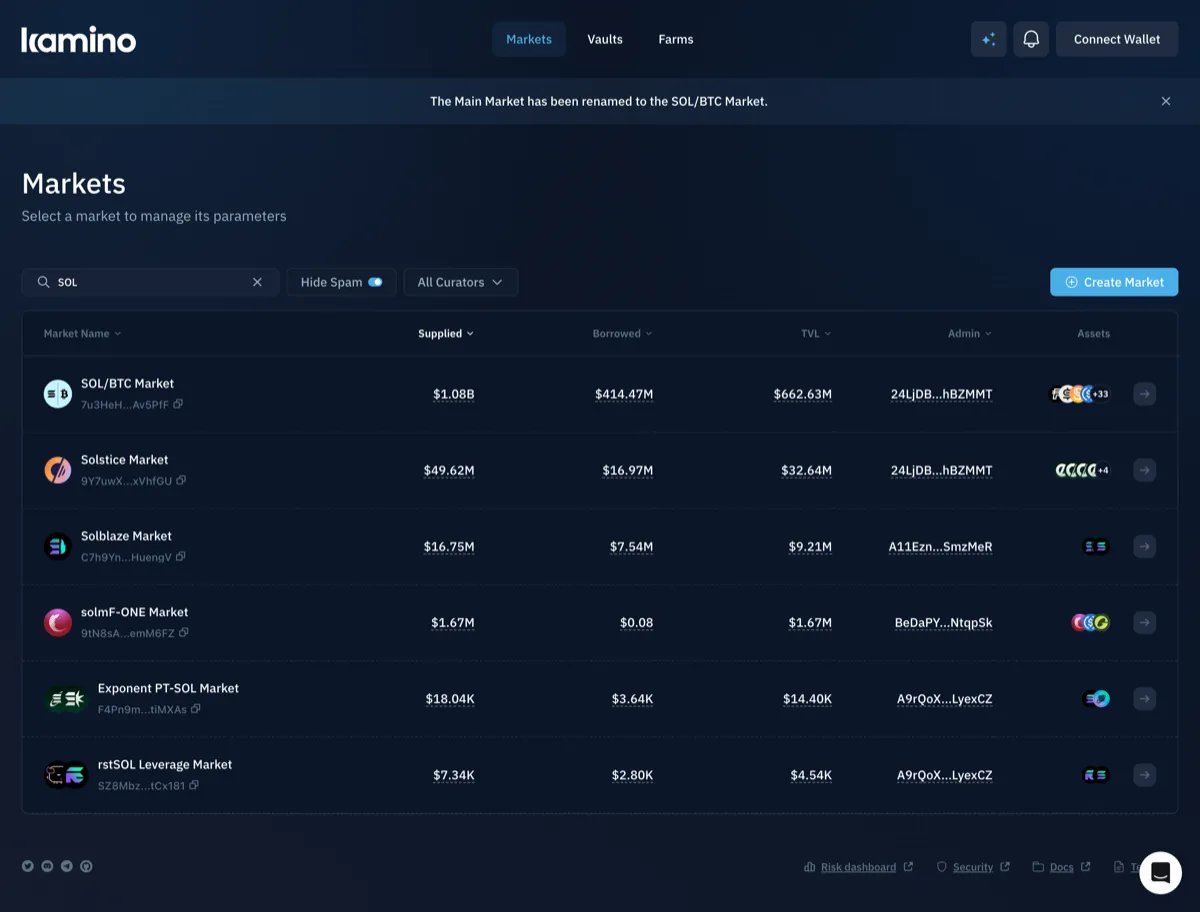
A Kamino lending market brings together a curated set of assets that users can supply and borrow. The curator chooses those assets and sets the parameters that govern how the market operates. Because markets are isolated, the risks that follow from those decisions are contained within that market.
 ***
## A Market in One Example
Before deciding how to configure a market, it helps to understand how its core components work together. Consider a market with two reserves, SOL and USDC. Each reserve represents an asset available within the market, with its own configuration for how that asset can be supplied, borrowed, or used as collateral.
Lenders supply USDC to the market and earn interest when that USDC is borrowed. A borrower can access that liquidity by depositing SOL as **collateral** and borrowing USDC against it.
Suppose a borrower deposits 100 SOL worth \$20,000 and borrows \$12,000 USDC. The position has an **LTV of 60%**: \$12,000 of debt against \$20,000 of collateral. If the SOL reserve has a maximum LTV of 70%, the borrower could borrow up to \$14,000.
The position remains healthy until it reaches the **liquidation threshold**. At a threshold of 75%, the \$12,000 debt becomes eligible for liquidation when the value of the SOL collateral falls to \$16,000, or \$160 per SOL.
A **liquidator** can then repay part of the borrower's debt in exchange for some of their SOL collateral. To make liquidation worthwhile, the liquidator receives slightly more collateral than the value of the debt they repay. This difference is the **liquidation bonus**. With an 8% liquidation bonus, a liquidator who repays \$1,000 of USDC debt receives \$1,080 worth of SOL.
The **close factor** determines how much of the borrower's debt can be repaid in a single liquidation. With a 20% close factor, a position with \$12,000 of outstanding debt can have up to **\$2,400 repaid in one liquidation**.
The **oracle** provides the prices used to value the borrower's SOL collateral and USDC debt. As those prices change, the position's LTV changes with them, which determines when the position reaches the liquidation threshold.
**Caps** limit how large the market can grow. A deposit cap limits how much SOL can be supplied to the reserve, while a borrow cap limits how much USDC can be borrowed from it.
If the value of SOL falls too quickly for the position to be liquidated in time, the collateral may no longer be worth enough to repay the debt. The remaining shortfall becomes **bad debt**, reducing the amount USDC lenders can withdraw from the reserve.
***
## Who Participates in a Lending Market
A market can support three main types of users: lenders, borrowers, and loopers. Each interacts with the market differently and introduces a different kind of demand and risk.
***
## A Market in One Example
Before deciding how to configure a market, it helps to understand how its core components work together. Consider a market with two reserves, SOL and USDC. Each reserve represents an asset available within the market, with its own configuration for how that asset can be supplied, borrowed, or used as collateral.
Lenders supply USDC to the market and earn interest when that USDC is borrowed. A borrower can access that liquidity by depositing SOL as **collateral** and borrowing USDC against it.
Suppose a borrower deposits 100 SOL worth \$20,000 and borrows \$12,000 USDC. The position has an **LTV of 60%**: \$12,000 of debt against \$20,000 of collateral. If the SOL reserve has a maximum LTV of 70%, the borrower could borrow up to \$14,000.
The position remains healthy until it reaches the **liquidation threshold**. At a threshold of 75%, the \$12,000 debt becomes eligible for liquidation when the value of the SOL collateral falls to \$16,000, or \$160 per SOL.
A **liquidator** can then repay part of the borrower's debt in exchange for some of their SOL collateral. To make liquidation worthwhile, the liquidator receives slightly more collateral than the value of the debt they repay. This difference is the **liquidation bonus**. With an 8% liquidation bonus, a liquidator who repays \$1,000 of USDC debt receives \$1,080 worth of SOL.
The **close factor** determines how much of the borrower's debt can be repaid in a single liquidation. With a 20% close factor, a position with \$12,000 of outstanding debt can have up to **\$2,400 repaid in one liquidation**.
The **oracle** provides the prices used to value the borrower's SOL collateral and USDC debt. As those prices change, the position's LTV changes with them, which determines when the position reaches the liquidation threshold.
**Caps** limit how large the market can grow. A deposit cap limits how much SOL can be supplied to the reserve, while a borrow cap limits how much USDC can be borrowed from it.
If the value of SOL falls too quickly for the position to be liquidated in time, the collateral may no longer be worth enough to repay the debt. The remaining shortfall becomes **bad debt**, reducing the amount USDC lenders can withdraw from the reserve.
***
## Who Participates in a Lending Market
A market can support three main types of users: lenders, borrowers, and loopers. Each interacts with the market differently and introduces a different kind of demand and risk.
Lending
Lenders supply assets such as USDC to earn interest. They provide the liquidity borrowers use, and their main risk is that losses in the reserve can reduce the amount they are able to withdraw.
Borrowing
Borrowers deposit collateral and borrow another asset against it. They create demand for the liquidity supplied by lenders, and they take on liquidation risk if the value of their collateral falls too far.
Looping
Loopers deposit SOL, borrow USDC against it, use that USDC to buy more SOL, and repeat. This lets them increase their exposure beyond what their starting capital would normally allow. Because each loop involves buying more SOL, sufficient market liquidity is needed for positions to open efficiently. If the collateral also earns staking yield, that yield applies to the larger position as well. Kamino Multiply automates the repeated borrow-and-buy loop in a single transaction.
In a SOL/USDC market dominated by loopers, many users may be borrowing USDC to buy more SOL. As more of the supplied USDC is borrowed, utilisation rises, meaning a larger share of the USDC in the reserve is already in use and less remains available. Kamino's risk controls are designed to keep this exposure within manageable bounds.
If SOL falls sharply, many looped positions may need to unwind around the same time. Loopers may sell SOL to repay USDC, while liquidators may also sell SOL received from unhealthy positions. This concentrates activity around the same assets and is one reason curators need to consider available liquidity when configuring a looping-heavy market.
***
## What Curators Should Consider Before Launch
Before launch, a curator needs to understand how much risk the market can safely support and configure it around those limits.
### Risk
Lenders and borrowers take on different risks. In the SOL/USDC example, lenders supply USDC to earn interest and do not depend on SOL increasing in value. The borrower deposits SOL as collateral instead of selling it, so they continue to benefit if SOL rises but also bear the loss if SOL falls. If the collateral loses value, the position moves closer to its health limit, the point where its collateral is no longer sufficient relative to its debt.
That does not mean USDC lenders are completely insulated from the risk of SOL's price falling. Their protection depends on the borrower's collateral remaining sufficient to cover the outstanding debt. Kamino uses a buffer between the maximum LTV and the health limit so positions have room to absorb price movement before liquidation is required. If the position reaches that limit, liquidation is designed to reduce the debt while the collateral can still cover it. If a shortfall still remains, it becomes bad debt in the USDC reserve and can reduce the amount lenders are able to withdraw.
Worth checking
* Who is lending and who is borrowing.
* What borrowers are using the borrowed asset for.
* Whether many borrowers are exposed to the same underlying trade.
* Who would ultimately absorb a loss if collateral no longer covers the debt.
LTV, thresholds, IR curves, and caps for each reserve.
Measured risk data across Kamino markets.
### Liquidity and Volatility
A position can only be closed safely if there is enough market liquidity to sell the collateral without moving its price too far.
**Liquidity** measures how much the price changes when collateral is sold, and curators need to look at that price impact at the sizes a liquidation may actually need to execute.
Available liquidity helps determine how large positions the market can safely support. Reserve caps and liquidation parameters should be set so collateral can be sold at expected liquidation sizes without price impact overwhelming the liquidation bonus.
**Volatility** measures how quickly the collateral price can move. More volatile assets need more room between the maximum LTV and the health limit so a position has time to be liquidated before the collateral value falls too far.
Worth checking
* Whether the collateral asset has enough market liquidity to be sold without significant price impact.
* How sharply the collateral asset has moved during previous periods of volatility.
* Whether that liquidity depends on incentives, and how much would remain if those incentives ended.
* Whether the proposed reserve caps are appropriate for the collateral asset's available market liquidity.
Use the [KRAF risk dashboard ↗](https://risk.kamino.finance/) to review liquidity and volatility data for the collateral asset when setting reserve parameters.
Measured volatility data.
On-chain liquidity analysis.
Live risk dashboard.
### Token and Oracle Risk
Before adding an asset to a market, a curator needs to understand both **the risks of the token itself** and **how its value will be determined onchain**. A token can introduce risks through its minting, transfer, or administrative controls, while the oracle determines the price Kamino uses to value collateral and debt.
**The token.** If new tokens can still be created, the curator needs to understand who controls that authority and how securely it is managed. If minting were abused, someone could create a large amount of the token, deposit it as collateral, and borrow another asset against it.
The debt asset's borrow cap also limits how much value can be borrowed from the market. Even if the collateral supply increases significantly, borrowing cannot exceed the cap set on the debt reserve.
Curators should also review any **freeze, upgrade, or transfer controls** that could affect how the token behaves after the market is live.
**The oracle.** The oracle determines the value Kamino uses for collateral and debt, so choosing the right price source is part of the market's risk design. For a liquid asset such as SOL, a market price may be appropriate. An RWA may instead rely on **Net Asset Value (NAV)**, while a **Liquid Staking Token (LST)**, which represents a staked asset plus the rewards it accrues, may use its staking exchange rate.
Whichever source is used, the price needs to stay current. If an oracle updates too slowly, Kamino may be working from a value that no longer reflects the market during a fast price move.
The market should also have a way to handle a price feed becoming unavailable or reporting an unexpected value. Using more than one independent price source, together with rules for stale or conflicting prices, can make the oracle setup more resilient.
Worth checking
* Whether the token has a **mint authority** or **freeze authority**, and who controls them.
* If new tokens can still be issued, how securely the minting process is managed.
* Which **price feeds** are configured for the asset, and what happens if one becomes stale or unavailable.
* Whether the chosen oracle setup matches how the asset is actually valued, such as market price, NAV, or a staking exchange rate.
Token risk, oracle pricing, depeg analysis.
Wire each reserve to a Scope price feed.
### Market Authority and Controls
Curators should choose who holds the market owner and emergency council roles, and understand how quickly each role can make changes to the market.
Changes to market and reserve settings made by the market owner are delayed by a timelock, giving signers time to review them and respond if a key or device has been compromised. The emergency council can act immediately, but only through a limited set of protective controls, so it can contain an incident without having full authority over the market.
| Role | What it can do | How quickly it can act |
| ---------------------- | -------------------------------------------------------------------------- | -------------------------------------------------- |
| **Market owner** | Can change market and reserve settings | Changes go through the owner multisig and timelock |
| **Emergency council** | Can make a limited set of protective changes that restrict market activity | Can act immediately without the owner timelock |
| **Proposer authority** | Can configure a reserve before its first deposit | Only applies during initial reserve setup |
The emergency council cannot restore normal operation after using these controls. Reversing those protective changes requires the market owner and is subject to the owner timelock.
Market changes should be protected by strong signing and approval controls. Curators should design the signing process so that no single compromised signer or device can change the market on its own. Sensitive changes can sit behind a multisig and timelock, while independent verification and external alerts help catch anything unexpected.
A timelock slows down parameter changes, so reserve caps should be set conservatively to keep the market safe during that delay. If a change is needed, the curator may have to wait for the timelock to expire before new parameters take effect, while the emergency council can only take protective actions such as disabling parts of the market.
Worth checking
* Whether the multisig has enough independent signers and an appropriate approval threshold.
* Whether signers use dedicated devices for approving market changes.
* How long the owner multisig timelock is, since that delay affects how conservatively reserve caps should be set.
* Whether the emergency council is configured and ready to act if needed.
* Whether external alerts are in place and someone is responsible for monitoring them outside normal hours.
Move ownership from a hot wallet to Squads.
Set up the emergency authority.
Pause, freeze, and socialize loss.
***
## Assessing Market Configuration
Curators should align the market's configuration with its expected risk and operating conditions.
### Setting Risk Parameters
Each reserve in a market has its own configuration, and each parameter governs a different part of how that reserve behaves.
| Parameter | Depends on | Sets |
| ----------------------------------- | ------------------------------------------------------- | ---------------------------------------------------------------------------------------------------- |
| LTV ratio and liquidation threshold | Collateral volatility and liquidity | How much can be borrowed against the collateral and when a position becomes eligible for liquidation |
| Interest rate curve | Target utilisation | The cost of borrowing as reserve utilisation changes |
| Deposit and borrow caps | Available collateral liquidity and timelock constraints | How much exposure the reserve can support |
| Withdrawal caps | Expected withdrawal activity | How quickly funds can leave the reserve |
| Liquidation bonus | Price impact at expected liquidation sizes | The incentive available to liquidators |
Reserve caps should be checked against the amount of collateral that may need to be liquidated. The collateral asset should have enough available liquidity for those liquidations to execute without price impact overwhelming the liquidation bonus.
Worth checking
* Whether the **LTV and liquidation threshold** leave enough room for the collateral asset's observed volatility. Use the proposed reserve parameters together with KRAF volatility data.
* Whether the **expected liquidation size** can be sold without excessive price impact. Use KRAF liquidity data for the collateral asset.
* Whether the **reserve caps** remain conservative enough during the owner multisig timelock.
* Whether the **liquidation bonus** is sufficient relative to the expected price impact at that liquidation size.
Full parameter reference and recommended values.
Throttle deposits, withdrawals, and debt activity.
Close factor, bonuses, and bad-debt handling.
### Oracle Configuration
Each reserve needs an oracle configuration that reflects how its asset should be valued.
Kamino Lend uses Scope, Kamino's oracle aggregator, to price reserve assets. Curators choose the Scope price feed that best reflects how each asset should be valued.
Curators can also configure safeguards that determine when a reserve should stop accepting an oracle price. These safeguards are disabled by default and need to be configured explicitly.
| Setting | What it does |
| --------------------- | --------------------------------------------------------------------------------- |
| **Heuristic bounds** | Sets a minimum and maximum accepted price |
| **TWAP divergence** | Limits how far the current price can deviate from the time-weighted average price |
| **Price age** | Sets how long a price can go without updating before it is rejected |
| **Block price usage** | Prevents the reserve from using its oracle price until the setting is changed |
> Heuristic bounds are manually configured minimum and maximum prices that an oracle price is allowed to fall within. They do not protect against unlimited minting because an increase in token supply may not change the reported oracle price. Reserve caps provide a separate limit on how much exposure the market can take on.
Worth checking
* Whether a suitable **Scope price feed** exists for the reserve asset.
* Whether the **heuristic bounds** allow plausible price movement while still rejecting clearly erroneous values.
* Whether the **TWAP divergence limit** can catch an unusual gap between the current price and its recent average, and whether the **price age limit** rejects a feed that has stopped updating.
* Whether `block_price_usage` has been tested before launch by the authority responsible for using it.
Wire each reserve to a Scope price feed with TWAP guards.
Composition types for fixed-income, multi-source, and LST assets.
***
## Steps to Taking the Market Live
Curators bring a market live through a defined sequence of setup steps.
Create the lending market. This initializes the `LendingMarket` account that will contain the market's reserves and configuration. See [Creating a market](/docs/curators/markets/creating-a-market).
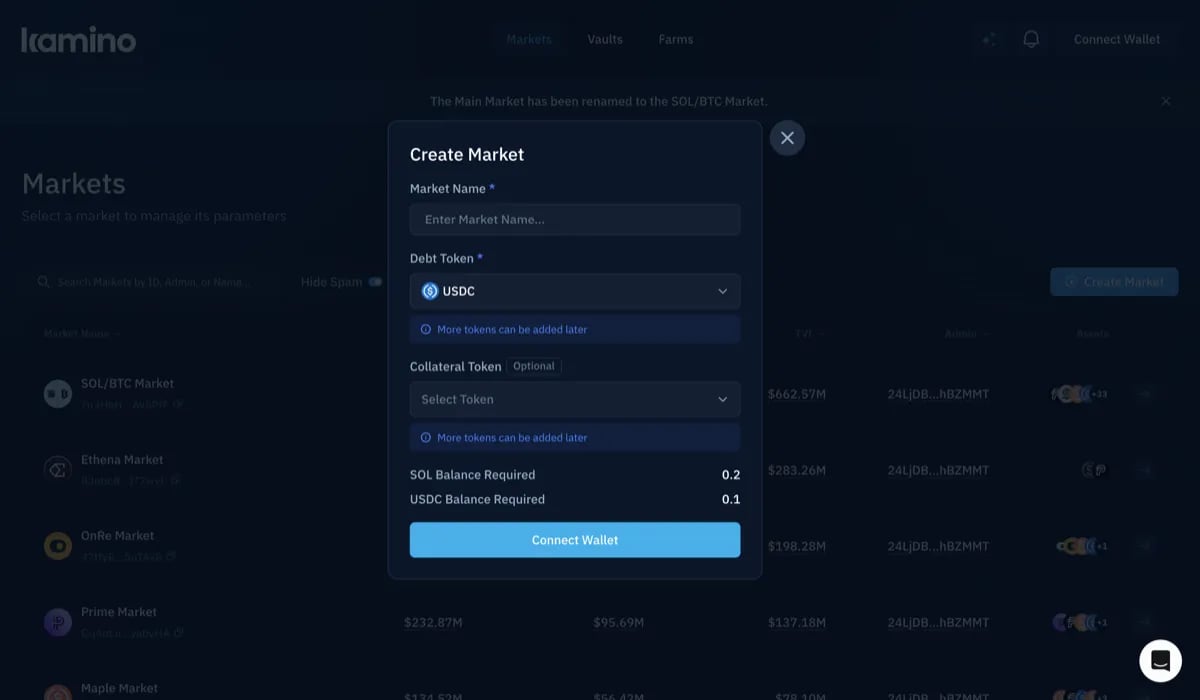 Add the reserves the market will support. One reserve per token mint per market. Typically, one reserve is added for the collateral asset and another for the asset users borrow. See [Adding reserves](/docs/curators/markets/adding-reserves).
Make the initial deposit into each reserve. A reserve must receive its first deposit before its configuration can be updated.
Set the reserve risk parameters for each reserve. See [Risk parameters](/docs/curators/markets/risk-parameters).
Connect each reserve to its Scope price feed. See [Configuring oracles](/docs/curators/markets/configuring-oracles).
Transfer market ownership from the setup wallet to the owner multisig. See [Transfer to multisig](/docs/curators/markets/transfer-to-multisig).
Assign the emergency council for the market. See [Emergency council](/docs/curators/markets/emergency-council).
Turn on external alerting for the market. Host it separately from the curator's own systems so a compromise cannot disable the alerts.
Open the market with lower initial reserve caps. These limits control how much can be deposited into and borrowed from each reserve, and can be raised gradually as the market begins operating.
**Liquidator coverage.** Liquidations are permissionless, so a new market is not guaranteed active liquidator coverage. Curators should confirm coverage before the market goes live. Liquidator tooling is open source, so curators can run their own if needed.
**Collateral liquidity.** If the market is intended to support looping, there needs to be enough liquidity to buy the collateral asset. Liquidations also require enough liquidity to sell it. Curators should confirm that liquidity is available before the market goes live and again before raising reserve caps.
Curators should increase reserve caps gradually after the market goes live. Each increase should follow a waiting period and be based on how the reserves are performing.
The full path from create to operate.
Stand up a working market on staging in \~10 minutes.
Market-level parameters and flags.
***
## Managing the Live Market
Once the market is live, curators can evaluate how each reserve is performing and decide when its configuration needs to change.
### Monitor and Adjust
Curators should monitor live reserve conditions to see whether the assumptions behind the configuration still hold.
Add the reserves the market will support. One reserve per token mint per market. Typically, one reserve is added for the collateral asset and another for the asset users borrow. See [Adding reserves](/docs/curators/markets/adding-reserves).
Make the initial deposit into each reserve. A reserve must receive its first deposit before its configuration can be updated.
Set the reserve risk parameters for each reserve. See [Risk parameters](/docs/curators/markets/risk-parameters).
Connect each reserve to its Scope price feed. See [Configuring oracles](/docs/curators/markets/configuring-oracles).
Transfer market ownership from the setup wallet to the owner multisig. See [Transfer to multisig](/docs/curators/markets/transfer-to-multisig).
Assign the emergency council for the market. See [Emergency council](/docs/curators/markets/emergency-council).
Turn on external alerting for the market. Host it separately from the curator's own systems so a compromise cannot disable the alerts.
Open the market with lower initial reserve caps. These limits control how much can be deposited into and borrowed from each reserve, and can be raised gradually as the market begins operating.
**Liquidator coverage.** Liquidations are permissionless, so a new market is not guaranteed active liquidator coverage. Curators should confirm coverage before the market goes live. Liquidator tooling is open source, so curators can run their own if needed.
**Collateral liquidity.** If the market is intended to support looping, there needs to be enough liquidity to buy the collateral asset. Liquidations also require enough liquidity to sell it. Curators should confirm that liquidity is available before the market goes live and again before raising reserve caps.
Curators should increase reserve caps gradually after the market goes live. Each increase should follow a waiting period and be based on how the reserves are performing.
The full path from create to operate.
Stand up a working market on staging in \~10 minutes.
Market-level parameters and flags.
***
## Managing the Live Market
Once the market is live, curators can evaluate how each reserve is performing and decide when its configuration needs to change.
### Monitor and Adjust
Curators should monitor live reserve conditions to see whether the assumptions behind the configuration still hold.
What to watch
* **Utilisation.** Watch whether reserve utilisation is approaching the point on the interest rate curve where borrowing rates begin rising sharply. If utilisation stays too high, most of the reserve liquidity is already borrowed, leaving less available for withdrawals.
* **Concentration.** Watch how much of the reserve's borrowing is concentrated in its largest positions. If one position represents a large share of the borrow cap, a single liquidation could be much larger than expected and place more pressure on available collateral liquidity.
* **Oracle health.** Watch for stale price updates or unusual differences between the current oracle price and its **time-weighted average price (TWAP)**. If borrowing stops unexpectedly, check whether an oracle safeguard has been triggered.
* **Liquidity.** Recheck how much of the collateral asset can be bought or sold without significant price impact. If that liquidity is incentive-driven, watch for changes as incentives decline or end.
Curators should define when each monitored condition requires action, so changes in reserve performance have a clear response.
Reserve cap increases are configuration changes, so they must be approved through the same authority and timelock used for other reserve updates.
Query reserve and market state.
Edit reserve configurations after launch.
### Incident Response
In each case the first move stops the exposure growing. The cause gets dealt with after.
Price feed wrong or stale
Signal: divergence alert, staleness alert, or a price that does not match other venues.
First move: block\_price\_usage on the affected reserve. Emergency council, no timelock.
Collateral token compromised
Signal: unexpected change in supply, public disclosure, or a mint from an authority believed revoked.
First move: borrow cap to 0 and LTV to 0. Emergency council.
Position underwater, nobody liquidating
Signal: a position above its liquidation threshold that just sits there.
First move: measure the gap at real fill prices. If the bonus no longer covers impact, raise it (owner action, waits on timelock). socialize\_loss comes last.
Signer compromised
Signal: a proposal nobody created, or an approval from an unexpected signer.
First move: market emergency mode or borrowing disabled. Emergency council. Then rotate the multisig.
Alerting should run outside the curator's own hosting. A compromise that reaches the curator's systems would otherwise switch off the alerts reporting it. The incident contact at Kamino should be agreed before launch.
Full reference for pause, freeze, and loss socialization.
What the council can and cannot do.
***
## Worked Example
This worked example shows how a curator can turn market observations into a market configuration. Using the SOL/USDC market, it shows how those conditions shape reserve settings and how the resulting configuration can be tested before exposure is increased.
The figures are illustrative and are not Kamino recommendations.
### Measured Inputs
The curator starts with existing information about the market before choosing any reserve parameters. For SOL, the most important starting point is its liquidity and volatility under real trading conditions.
| Input | Example |
| -------------------------------------- | ------: |
| SOL price | \$200 |
| Price impact on a \$2m sale | 0.4% |
| Price impact on a \$10m sale | 1.6% |
| Price impact on a \$25m sale | 4.5% |
| 30-day annualised volatility | 60% |
| Largest single-day fall over 12 months | 18% |
### Market Setup Inputs
The worked example also assumes the reserve already has a suitable Scope price feed and that the market's authority roles have been configured.
| Input | Example |
| ----------------- | --------------------------------------- |
| Oracle | Scope SOL/USD entry with TWAP available |
| Market owner | 3-of-5 multisig with a 12-hour timelock |
| Emergency council | 2-of-4, no timelock |
| Mint authority | None; SOL is the native asset |
### Initial Configuration
The first question is how much room to leave between borrowing and liquidation. With SOL moving about 3.2% on an average day in this example, a 70% LTV and 77% liquidation threshold leave a seven-point buffer before a position becomes liquidatable.
Next, the curator can focus on how borrowing costs should change as the USDC reserve fills. The borrow-rate curve keeps rates relatively low through 80% utilisation, then increases them more aggressively as available liquidity becomes tighter.
| Utilisation | Borrow rate |
| ----------- | ----------: |
| 0% | 0.5% |
| 80% | 6% |
| 95% | 25% |
| 100% | 150% |
New borrowing is blocked at 90% utilisation, after the borrow rate has already begun rising more sharply. This gives the interest-rate curve a chance to slow borrowing before the reserve reaches its hard limit.
### Exposure Limits
The curator can then decide how much SOL exposure the reserve should allow. SOL is used only as collateral, so its borrow limit is set to 0. The deposit limit is set to 10,000 SOL, which caps how much SOL can enter the reserve.
For the USDC reserve, the curator can set how much USDC can be borrowed across the market. In this example, the borrow limit is set to \$5 million.
Because that limit is shared by all borrowers, it does not cap the size of an individual position. The curator therefore needs to test what happens if a large share of that debt becomes concentrated in one position.
### Liquidation Capacity
Before choosing the liquidation bonus, it helps to revisit what happens during a liquidation. A liquidator repays part of the borrower's USDC debt and receives SOL collateral in return. The liquidation bonus means the liquidator receives slightly more SOL than the value of the USDC they repaid.
If a borrower held \$5 million of USDC debt, a 20% close factor would allow up to \$1 million of that debt to be repaid in one liquidation. With a 5% bonus, the liquidator would receive about \$1.05 million worth of SOL.
The liquidator may sell that SOL on an external market to recover the USDC used to repay the debt. Selling a large amount of SOL can move its market price, which is why the curator needs to compare the expected liquidation size with SOL's available trading liquidity.
### Withdrawal Limits
Withdrawal caps control how quickly users can remove liquidity from a reserve. They do not limit how much collateral a liquidator can receive or sell during a liquidation.
In this example, the SOL withdrawal cap is set to 5,000 SOL over 24 hours, while the USDC withdrawal cap is set to \$2 million over the same period.
The USDC debt withdrawal cap controls how quickly new borrowing can increase. In this example, it is set to \$1 million over 24 hours, so even if the reserve is still below its overall \$5 million borrow limit, debt cannot grow faster than that rate.
### Liquidation Bonus
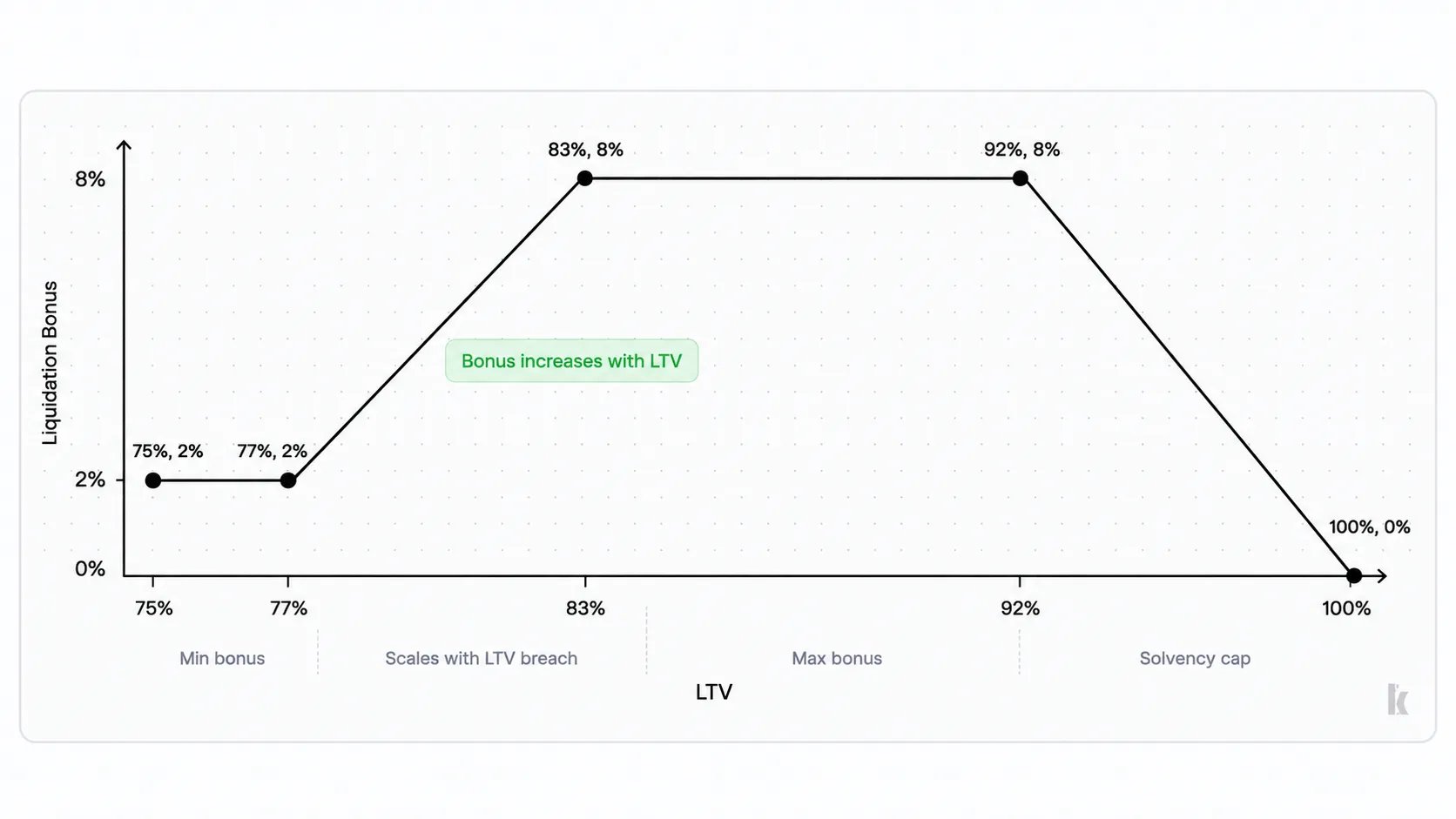
The liquidation bonus compensates the liquidator for the cost and risk of closing the position. If a liquidator repays \$1 million of USDC debt with a 5% bonus, they receive about \$1.05 million worth of SOL.
If selling that SOL causes less than 0.4% price impact, only a small part of the 5% bonus is lost during the sale. The remaining value helps cover transaction costs and provides the liquidator's incentive to execute the liquidation.
The minimum bonus is set to 2%, so a liquidator is still rewarded when a position has only just crossed the liquidation threshold. As the position becomes less healthy, the bonus can increase toward the 5% maximum.
 ### Stress Check and Revision
The curator should then test how the position holds up during a sharp fall in SOL. In the measured period, SOL fell as much as 18% in a single day, so the example uses that move as a stress case.
Assume a position has \$100 of SOL collateral and \$77 of USDC debt at the liquidation threshold. If the full \$77 of debt had to be repaid through liquidation, a 5% bonus would require liquidators to receive \$80.85 worth of SOL collateral.
That leaves \$19.15 of the original \$100 collateral value. An 18% fall in SOL would almost wipe out that remaining cushion, leaving only about \$1.15 of value before the position no longer has enough collateral to comfortably cover the debt and liquidation bonus.
To create more room, the example lowers the liquidation threshold from 77% to 75%. With \$100 of collateral, that means liquidation begins at \$75 of debt instead of \$77, so the position is acted on earlier and more collateral value remains available to absorb further price movement.
The LTV is then reduced to 68% to preserve the same seven-point gap between borrowing and liquidation.
### Oracle Configuration
Next, the curator can configure how the SOL reserve is priced. The reserve uses a Scope SOL/USD feed, with safeguards that determine when that price should no longer be trusted.
| Setting | Example |
| ------------------------- | ------------- |
| Price feed | Scope SOL/USD |
| `max_age_price_seconds` | 60 |
| `max_age_twap_seconds` | 240 |
| `max_twap_divergence_bps` | 500 |
| Heuristic lower bound | \$5 |
| Heuristic upper bound | \$2,000 |
The price age limits reject updates that have become stale, while the TWAP divergence limit rejects a current price that has moved too far from its recent average. The heuristic bounds provide an additional check against clearly invalid SOL prices.
### First Cap Increase
After the market has operated without incident and SOL liquidity has been remeasured, the curator increases the USDC borrow limit from \$5 million to \$10 million.
***
## Pre-launch Checklist
Before opening the market, confirm that the setup is complete and each configuration choice has been verified.
### Market Readiness
* [ ] The intended lending and borrowing activity is clear.
* [ ] Price impact has been measured at the expected liquidation size.
* [ ] The collateral asset's largest recent price moves have been reviewed.
* [ ] Token authorities have been checked, including mint and freeze authority where applicable.
* [ ] The debt reserve's borrow cap limits the market's exposure if collateral supply increases unexpectedly.
* [ ] Liquidator coverage has been confirmed before launch.
* [ ] If market liquidity depends on an issuer, the expected liquidity commitment has been confirmed.
### Authority and Controls
* [ ] The owner multisig is configured with the intended signer threshold.
* [ ] The owner timelock is set to the intended duration.
* [ ] The emergency council is configured and able to act without the owner timelock.
* [ ] External alerting is active.
* [ ] An incident contact at Kamino has been agreed.
* [ ] The signing process has been tested before launch.
### Reserve Configuration
* [ ] The gap between LTV and the liquidation threshold covers the collateral asset's observed volatility.
* [ ] The utilisation block sits above the interest-rate curve kink.
* [ ] Deposit and borrow caps are set to the intended launch size.
* [ ] The expected liquidation size can be sold without excessive price impact.
* [ ] Withdrawal caps are set on both reserves.
* [ ] The maximum liquidation bonus is above the expected price impact at the liquidation size.
* [ ] The minimum liquidation bonus is below the maximum.
* [ ] The liquidation threshold still leaves enough collateral value after the maximum bonus is applied.
### Oracle Configuration
* [ ] A suitable Scope price feed exists for each reserve asset.
* [ ] Price age limits are configured.
* [ ] TWAP divergence limits are configured.
* [ ] Heuristic price bounds are configured.
* [ ] The oracle setup has been tested before launch.
* [ ] `block_price_usage` has been tested by the authority that would use it during an incident.
### Launch Checklist
* [ ] The full market setup sequence has been rehearsed on staging.
* [ ] The seed deposit has been made before any reserve configuration write.
* [ ] Market ownership has been transferred to the multisig.
* [ ] Growth criteria have been written down before opening the market.
* [ ] Every signer has reviewed the incident response process.
### Stress Check and Revision
The curator should then test how the position holds up during a sharp fall in SOL. In the measured period, SOL fell as much as 18% in a single day, so the example uses that move as a stress case.
Assume a position has \$100 of SOL collateral and \$77 of USDC debt at the liquidation threshold. If the full \$77 of debt had to be repaid through liquidation, a 5% bonus would require liquidators to receive \$80.85 worth of SOL collateral.
That leaves \$19.15 of the original \$100 collateral value. An 18% fall in SOL would almost wipe out that remaining cushion, leaving only about \$1.15 of value before the position no longer has enough collateral to comfortably cover the debt and liquidation bonus.
To create more room, the example lowers the liquidation threshold from 77% to 75%. With \$100 of collateral, that means liquidation begins at \$75 of debt instead of \$77, so the position is acted on earlier and more collateral value remains available to absorb further price movement.
The LTV is then reduced to 68% to preserve the same seven-point gap between borrowing and liquidation.
### Oracle Configuration
Next, the curator can configure how the SOL reserve is priced. The reserve uses a Scope SOL/USD feed, with safeguards that determine when that price should no longer be trusted.
| Setting | Example |
| ------------------------- | ------------- |
| Price feed | Scope SOL/USD |
| `max_age_price_seconds` | 60 |
| `max_age_twap_seconds` | 240 |
| `max_twap_divergence_bps` | 500 |
| Heuristic lower bound | \$5 |
| Heuristic upper bound | \$2,000 |
The price age limits reject updates that have become stale, while the TWAP divergence limit rejects a current price that has moved too far from its recent average. The heuristic bounds provide an additional check against clearly invalid SOL prices.
### First Cap Increase
After the market has operated without incident and SOL liquidity has been remeasured, the curator increases the USDC borrow limit from \$5 million to \$10 million.
***
## Pre-launch Checklist
Before opening the market, confirm that the setup is complete and each configuration choice has been verified.
### Market Readiness
* [ ] The intended lending and borrowing activity is clear.
* [ ] Price impact has been measured at the expected liquidation size.
* [ ] The collateral asset's largest recent price moves have been reviewed.
* [ ] Token authorities have been checked, including mint and freeze authority where applicable.
* [ ] The debt reserve's borrow cap limits the market's exposure if collateral supply increases unexpectedly.
* [ ] Liquidator coverage has been confirmed before launch.
* [ ] If market liquidity depends on an issuer, the expected liquidity commitment has been confirmed.
### Authority and Controls
* [ ] The owner multisig is configured with the intended signer threshold.
* [ ] The owner timelock is set to the intended duration.
* [ ] The emergency council is configured and able to act without the owner timelock.
* [ ] External alerting is active.
* [ ] An incident contact at Kamino has been agreed.
* [ ] The signing process has been tested before launch.
### Reserve Configuration
* [ ] The gap between LTV and the liquidation threshold covers the collateral asset's observed volatility.
* [ ] The utilisation block sits above the interest-rate curve kink.
* [ ] Deposit and borrow caps are set to the intended launch size.
* [ ] The expected liquidation size can be sold without excessive price impact.
* [ ] Withdrawal caps are set on both reserves.
* [ ] The maximum liquidation bonus is above the expected price impact at the liquidation size.
* [ ] The minimum liquidation bonus is below the maximum.
* [ ] The liquidation threshold still leaves enough collateral value after the maximum bonus is applied.
### Oracle Configuration
* [ ] A suitable Scope price feed exists for each reserve asset.
* [ ] Price age limits are configured.
* [ ] TWAP divergence limits are configured.
* [ ] Heuristic price bounds are configured.
* [ ] The oracle setup has been tested before launch.
* [ ] `block_price_usage` has been tested by the authority that would use it during an incident.
### Launch Checklist
* [ ] The full market setup sequence has been rehearsed on staging.
* [ ] The seed deposit has been made before any reserve configuration write.
* [ ] Market ownership has been transferred to the multisig.
* [ ] Growth criteria have been written down before opening the market.
* [ ] Every signer has reviewed the incident response process.